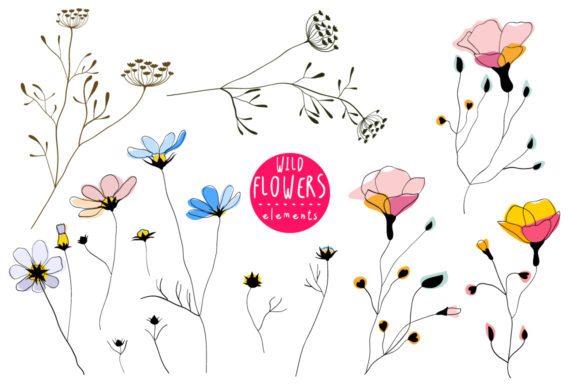
Wild Flowers Elements and Patterns: A Practical Guide for Designers and Creatives
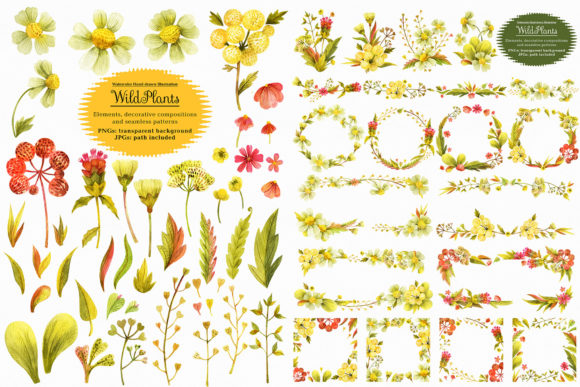
Botanical motifs have long held a cherished place in visual design, offering a sense of organic beauty that resonates across industries, from fashion and textiles to branding and digital media. Among the many resources available to creatives today, the Wild Flowers Elements and Patterns collection stands out for its thoughtful construction and immediate usability. This set, delivered as a comprehensive ZIP archive containing EPS-CS pattern swatches and high-resolution JPG seamless repeats, provides designers with a versatile toolkit. But what exactly makes such a collection valuable in a professional workflow, and how can you get the most out of it? Let's explore the practical dimensions of working with these floral assets.
Understanding the Core Components of the Collection
Before diving into applications, it is essential to understand what the ZIP archive actually contains and how each component serves a distinct purpose in the design process. The collection is split into two primary file types, each tailored to different stages of creation and different software environments.
The EPS-CS Pattern Swatches
Inside the archive, you will find 12 pattern swatches formatted for the Swatches Palette in Adobe Illustrator (EPS-CS compatibility). These are not just raster images placed into a file; they are vector-based patterns that can be applied as fills to any shape, text, or path in Illustrator. This means that scaling, rotating, or recoloring the pattern is non-destructive and lossless. For a designer working on branding or packaging, this is a significant time-saver. Instead of manually tiling a floral motif across a label or a business card, you simply click the swatch, and the pattern fills the object instantly. The pattern tiles seamlessly, so there are no visible edges or breaks, regardless of the shape's size.
The High-Resolution JPG Seamless Patterns
In addition to the vector swatches, the archive includes 12 high-resolution JPGs of the same seamless patterns, each sized at a generous 4861x4861 pixels. This resolution is deliberately chosen. At 300 DPI, that equates to roughly a 16x16 inch printable area, making these files suitable for large-format prints like posters, wallpaper samples, or fabric mockups. Because these are raster files, they are immediately usable in software that does not support native vector patterns, such as Adobe Photoshop, Procreate, Canva, or Affinity Photo. The seamless tiling is built directly into the JPG, so you can place the image into a document, duplicate it, and align the edges without any visible seam. This eliminates the tedious work of manually cloning or healing edges to create a repeat.
How Wild Flowers Elements and Patterns Fit into Modern Workflows
Designers today work across multiple platforms, often jumping between vector and raster applications within the same project. The dual-format nature of this collection acknowledges that reality. You are not locked into one ecosystem.
Consider a typical branding project. You might start in Adobe Illustrator, creating a logo and a set of brand guidelines. Using the EPS-CS swatches, you can quickly test a Wild Flowers Elements and Patterns fill on a background shape for a mood board or a business card prototype. Later, when you move the project into Photoshop to produce a mockup of a tote bag or a website hero image, the same pattern is available as a high-res JPG. You can place it as a smart object, scale it, and adjust blending modes without losing quality. This continuity between software environments reduces friction and keeps the creative flow uninterrupted.
For surface pattern designers and textile artists, the value proposition is even more direct. Creating a seamless repeat from scratch is a skill that takes years to master. It involves aligning motifs on a grid, checking for awkward gaps, and ensuring that the eye flows naturally across the tile. With this collection, that work is already done. The 12 patterns offer a range of floral compositions, from densely packed wildflower clusters to more airy, spaced-out arrangements. You can use them as a starting point for a textile design, layering additional elements on top, or you can use them as-is for a quick client presentation. The 4861x4861 pixel resolution also ensures that the pattern remains crisp even when printed at a substantial size, which is critical for fabric samples or wallpaper mockups.
Practical Benefits of Using Pre-Made Floral Patterns
Some designers hesitate to use pre-made patterns, concerned that their work might lose originality. However, a collection like Wild Flowers Elements and Patterns should be viewed as a building block, not a finished product. The real skill lies in how you integrate and customize it.
- Speed and efficiency: When a client deadline is tight, having a library of seamless patterns allows you to generate multiple design directions in hours rather than days. You can present five different floral backgrounds to a client, gauge their preference, and then refine the chosen direction with custom overlays or color adjustments.
- Consistency across media: Because the same pattern exists in both vector swatch and raster JPG format, you can maintain visual consistency across print, digital, and environmental design. The pattern on a website header can match the pattern on a product label exactly, because you are using the same source tile.
- Cost-effective exploration: Not every project requires a bespoke pattern from scratch. For internal mood boards, concept pitches, or social media templates, using a pre-made pattern saves budget and time that can be allocated to higher-priority custom work like illustration or typography.
Key Qualities to Look for in a Pattern Collection
Not all floral pattern packs are created equal. When evaluating a resource like this, there are several characteristics that determine whether it will actually perform well in real projects. Based on what this archive offers, here are the qualities that matter most.
Seamless Tile Construction
A pattern that shows obvious repeats or hard edges is essentially unusable for professional work. The fact that both the EPS-CS swatches and the JPGs are seamless means you can tile them across large areas without distraction. The 4861x4861 pixel JPGs are large enough that even a single tile can cover a substantial area without repeating, reducing the likelihood of visible repetition in many common use cases.
Color Palette Versatility
The aesthetic of wild flowers often leans toward natural, earthy tones, but the specific palette in this collection matters for your specific project. In the EPS-CS format, recoloring is straightforward. You can open the pattern in Illustrator, adjust the hues of individual floral elements, or globally shift the color scheme using Recolor Artwork. This flexibility allows you to adapt the same pattern to a spring-themed catalog, an autumn wedding invitation, or a muted neutral background for a minimalist brand. The ability to recolor vector patterns without losing the underlying complexity of the floral arrangements is a huge advantage over a static raster image.
Resolution and Print Readiness
The 4861x4861 pixel resolution is not arbitrary. It aligns with common print requirements for large-format outputs. At 150 DPI, which is acceptable for large posters or banners, that pattern prints to over 32 inches. At 300 DPI, you get a clean 16-inch tile, which is perfect for standard packaging, book covers, or fabric swatches. This resolution also allows for cropping. You can zoom into a portion of the pattern and still have enough pixels to fill a full-screen digital background, giving you multiple compositions from a single tile.
Real-World Applications and Scenarios
To appreciate the practical utility of Wild Flowers Elements and Patterns, it helps to consider specific scenarios across different creative disciplines.
Scenario 1: A stationery designer creating a wedding suite. The client wants a romantic, garden-inspired theme. The designer opens Illustrator and applies a wild flower pattern swatch to the inner envelope liner. They then use the same pattern, exported as a JPG, as a faint background image on the ceremony program. Because the pattern is seamless, the liner has no awkward seams, and the program background has a consistent organic texture. The designer can also pull individual elements from the pattern (though this set focuses on full swatches) to create custom monogram frames or border details.
Scenario 2: A UX/UI designer working on a lifestyle brand website. The hero section of the homepage needs a soft, botanical texture without distracting from the product photography. The designer uses the JPG pattern as a CSS background image, set to repeat. The 4861px tile ensures that even on large monitors, the pattern does not repeat too frequently. On mobile, the pattern scales down gracefully. No additional slicing or optimization is needed because the tile is large enough to cover most viewports without a visible repeat.
Scenario 3: A textile designer creating a prototype for a fabric collection. They import the EPS-CS swatch into Illustrator, resize the pattern to match the scale they want for a scarf design, and then print a mockup on fabric paper. The seamless construction means there is no visible line where the tile repeats, which is crucial for fabric where seams would be obvious. The designer can also experiment with different colorways quickly, presenting multiple options to the client in a single meeting.
Recommendations for Getting the Most Out of This Collection
Having used similar pattern collections across many projects, there are a few practical strategies that can help you maximize the value of Wild Flowers Elements and Patterns.
- Organize your swatches by theme. If you use this set alongside other pattern libraries, create a dedicated swatch group in Illustrator for the 12 floral patterns. This saves time when flipping through options during a project.
- Test scale early. A pattern that looks beautiful on a small swatch might feel overwhelming when applied to a full-page background. Use the scale tools in Illustrator or Photoshop to adjust the pattern size before committing to a layout. Because the vector swatches are resolution-independent, you can scale them up or down without any quality loss.
- Layer patterns with transparency. One of the easiest ways to make a pre-made pattern feel custom is to overlay it with a gradient or a semi-transparent solid color. This softens the pattern and integrates it into the overall design rather than having it sit as a flat texture on top.
- Combine with other elements. While this collection focuses on patterns, you can pair it with individual floral illustrations or typography to create a richer composition. The patterns serve as an excellent background or texture, while custom elements provide the unique focal points.
It is also worth noting that the EPS-CS format is compatible with many versions of Adobe Illustrator, which is a practical consideration for teams that may not be on the latest software release. You can open the swatches in older versions without compatibility issues, making this a reliable resource for studios with mixed software environments.
Final Considerations Before Choosing a Pattern Set
When deciding whether Wild Flowers Elements and Patterns is the right fit for your next project, consider the scope and nature of your work. If you frequently design materials that call for floral motifs, such as wedding invitations, nature-themed branding, editorial layouts, or packaging for organic products, having a library of 12 seamless patterns at this resolution and format will likely pay for itself in time saved. The versatility of having both vector swatches and high-res JPGs means you are prepared for almost any deliverable format, from a digital-only social media campaign to a large-format trade show banner.
On the other hand, if your work is heavily reliant on hyper-custom illustration where every petal must be placed according to a specific brief, a pre-made pattern set may serve better as a reference or a base layer rather than a final surface. Even in that case, the ability to deconstruct the pattern swatch in Illustrator and borrow individual motifs or compositional ideas can be a valuable learning tool and time-saver.
Ultimately, the best resources are those that fit seamlessly into your existing workflow while expanding your creative possibilities. With its dual-format delivery, generous resolution, and thoughtful vector construction, this collection achieves exactly that. Whether you are a seasoned designer looking to speed up your process or a newcomer building a toolkit of reliable assets, the Wild Flowers Elements and Patterns archive offers a practical, high-quality foundation for botanical-inspired work.