Mystic Seamless Pattern: Integrating Hand-Drawn Vector Art into Production Workflows
Design assets that balance intricate detail with practical scalability are rare. Mystic Seamless Pattern delivers exactly that: a high-resolution, hand-drawn vector set featuring mystical eyes and esoteric motifs, prepared for immediate use across textiles, wallpapers, digital backgrounds, and printed collateral. Whether you are a surface pattern designer, a small business owner launching a product line, or a marketer building a cohesive visual identity, understanding how to integrate this asset into your workflow can save hours of preparation time and elevate the final output.
What Mystic Seamless Pattern Offers as a Production Asset
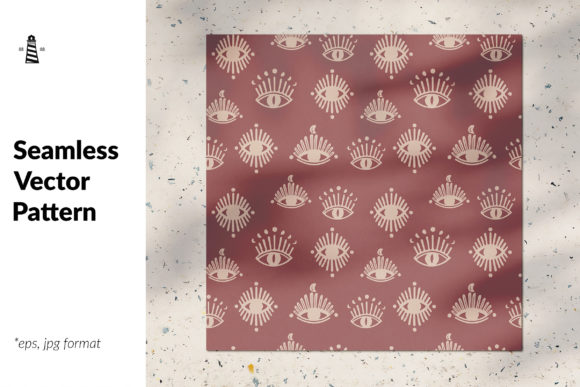
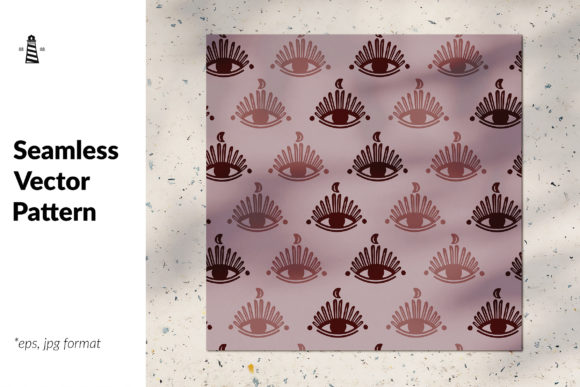
This pattern is not a single file but a complete delivery package. You receive an EPS file, an AI vector file, a JPG image, and the final pattern is rendered at 69 x 69 inches at 300 dpi. That resolution matters: you can print it on large-format wallpaper or fabric without pixelation, or scale it down for digital use without losing sharpness. The hand-drawn nature means every line carries intentional variation, giving the pattern a bespoke feel that purely algorithmic repeats often lack.
The mystical eye motifs are carefully arranged so the repeat is seamless. No awkward seams, no visible tile edges. For anyone who has spent hours trying to fix a poorly constructed repeat in Illustrator or Photoshop, this alone is a significant time saver. The pattern works as a standalone design element or as a layer within a larger composition.
File Format Compatibility and Preparation
Before you open the files, confirm your software version. The AI vector file is compatible with Adobe Illustrator, but you can also open EPS files in Affinity Designer, CorelDRAW, or even Inkscape with good results. If you plan to edit colors or rearrange elements, the vector format is your best choice. The JPG serves as a quick preview or a ready-to-use raster option for web backgrounds, social media graphics, or digital mockups.
- EPS file – Best for cross-platform workflows and legacy software.
- AI file – Full editability if you use Adobe Illustrator; layers and paths remain intact.
- JPG image – Drop directly into Canva, PowerPoint, or any raster-based tool.
Keep all three files organized in a dedicated project folder. Name them consistently so you can locate the editable vector version later if you need to tweak the scale or color palette.
Where Mystic Seamless Pattern Fits in Your Process
Integrating a pre-made seamless pattern into a project is not a single step. It can enter your workflow at multiple points, depending on your role and the scope of work.
Before Production: Planning and Moodboarding
If you are still defining the visual direction of a collection, brand, or campaign, use the pattern early. Place it in a mood board alongside typography, texture samples, and color swatches. The mystical eye motif suggests themes of intuition, mystery, and layered meaning. That can inform your copy tone, material choices, and overall aesthetic. For a textile line, seeing the pattern at full size early helps you decide whether it works as an all-over print or a secondary accent.
During Production: The Core Design Asset
This is where the pattern does the heavy lifting. Open the AI file and adjust the scale to fit your specific surface. A wallpaper project might require the pattern at 200% scale so the eyes feel monumental. A gift wrap design might keep it at 100% for an intricate, dense look. Because the vector file is resolution-independent, scaling does not degrade quality.
Work with layers. Place the pattern on a dedicated layer, then stack your typography or branding elements above it. The hand-drawn style pairs well with serif fonts or script lettering, but can also contrast cleanly with sans-serif for a modern edge. Test different blending modes: Multiply works well for darker backgrounds, while Overlay can soften the pattern into a subtle texture.
After Production: Quality Control and Consistency Checks
Before sending files to print, verify the repeat. Even though the pattern is marketed as seamless, always test it. Open the JPG in Photoshop, apply a Pattern Preview or use the Offset filter to shift the tile by 50% horizontally and vertically. Look for obvious jumps in line thickness or density. With hand-drawn vector art, minor variations in stroke weight are part of the charm, but you want to ensure no hard edges break the illusion of an infinite surface.
Check color consistency across different media. The JPG is flattened with a specific color profile. If you print on fabric, the same colors may shift due to dye absorption. Run a small test swatch before committing to a full production run.
Practical Implementation Across Use Cases
Different projects demand different approaches. Below are three common scenarios with specific integration tactics.
Textile and Fashion Production
For fabric printing, scale and repeat alignment are critical. Open the AI file and set the artboard to your fabric width (typically 44, 54, or 60 inches). Tile the pattern across the width, then rotate individual repeats slightly if you want a more organic, less mechanical look. Because the motifs are hand-drawn, slight rotation adds to the handcrafted feel without breaking the seamless nature.
Consider printing on dark backgrounds. The mystical eyes often feature lighter highlights or intricate linework that pops against deep indigo, charcoal, or burgundy. Test one yard before ordering bulk.
Digital Backgrounds and Web Assets
For web page backgrounds, the JPG at 300 dpi is overkill. Resize it to 1920 x 1080 pixels at 72 dpi for screen use. Better yet, open the vector file and export a web-optimized PNG with a transparent background so the pattern can sit behind content without a white bounding box. This is especially useful for landing pages, hero sections, or email headers where you want a mystical, immersive atmosphere without distracting from calls to action.
If you run a blog or online course, use the pattern as a section divider. Place a horizontal strip between content blocks. The repeating eye motif creates a natural rhythm that guides the reader's eye downward.
Stationery and Print Collateral
Greeting cards, invitations, and gift wraps benefit from the pattern's intricate detail because people hold these items and examine them closely. For a standard A2 card (4.25 x 5.5 inches), the pattern at 50% scale feels like an elaborate illustration rather than a repeating tile. Set the pattern on the inside flap or as a subtle watermark behind the main message. For gift wrap, use the full 69 x 69 inch JPG directly. That dimension covers a standard roll width, so you may only need to trim the length.
Workflow Efficiency and Organization
Once you have the files, organize them in a way that supports long-term reuse. Create a master asset library folder. Inside, keep a subfolder for Mystic Seamless Pattern with the EPS, AI, and JPG files. Add a text note with the hex codes of the dominant colors so you can quickly match them in future projects. If you edit the pattern (changed colors, scaled motifs, added effects), save a new version with a descriptive filename like mystic-eyes_pattern_scale-150pct_alt-color.ai.
This pattern is a vector asset, which means it can be colored and recolored infinitely. Use the AI file to create a few color variations: a metallic gold on black for luxury invites, a muted sage on cream for bohemian textiles, a vibrant magenta on deep purple for digital art. Each variation expands your library without requiring new purchases.
Collateral and Complementary Assets
This pattern works well with solid color blocks, geometric overlays, or subtle texture layers. Avoid pairing it with another highly detailed pattern, as the eye motifs need breathing room. If you use it as a background for product photography, keep the opacity low (20–30%) so the product remains the focal point. For packaging, use the pattern on the interior flap or as a wrapping tissue, reserving clean space for logos and product information on the exterior.
Long-Term Considerations and Maintenance
Vector files are future-proof. Unlike raster images that degrade with each edit and resave, the AI and EPS files remain editable indefinitely. Store them on a cloud service with version history so you can revert to the original if a heavy edit does not work out.
If you are a small business owner, consider creating a usage matrix for this pattern. List every product or channel where the pattern appears: website background, product packaging, social media templates, physical signage, trade show booth graphics. Having a visual bible ensures the pattern is used consistently across touchpoints. Consistency builds brand recognition, especially when the design is as distinctive as hand-drawn mystical motifs.
One practical note: hand-drawn patterns can sometimes appear too busy when scaled too large. Test the pattern at different sizes on a sample swatch before committing to a full production run. A pattern that looks perfect on a phone screen may overwhelm a sofa cushion or a wall. Trust your eyes and sample before scaling up.
Final Observations on Integration
Mystic Seamless Pattern is not a magic solution that automatically elevates every project. It is a tool. Its value depends on how thoughtfully you prepare your canvas, how well you pair it with other design elements, and how consistently you apply it across your work. Start with the vector file for maximum flexibility. Use the JPG for speed when you need a quick mockup. Keep the EPS as a universal fallback for clients or printers who use older software.
If you have questions about scaling, color editing, or printing specific to this pattern, contact the seller directly. The product description indicates the creator is open to inquiries. Asking before you buy or before you finalize a production run can save returns, reprints, or wasted materials. A five-minute conversation can clarify whether the pattern is suited for a particular fabric weave or digital platform.
Integrating a pre-made asset like this into a professional workflow reduces the time from concept to finished product. You skip the weeks of drawing, scanning, and perfecting a repeat, and instead start with a polished foundation. The remaining work is creative: deciding where and how the pattern tells your story. Use it with intention, and it will look like it was made for your project from the start.