Why Most Designers Overlook the True Potential of Plants of Scotland Watercolor Assets
You have seen them everywhere. Thistle silhouettes on wedding invitations, heather sprigs on branding boards, dandelions scattered across blog headers. The Plants of Scotland. Watercolor collection offers something rarer than most people realize. It is not simply a set of isolated botanical illustrations. It is a structured design system that can save hours of work. Yet many users treat it like any other clip-art pack. That is where the trouble begins.
Understanding What You Actually Downloaded
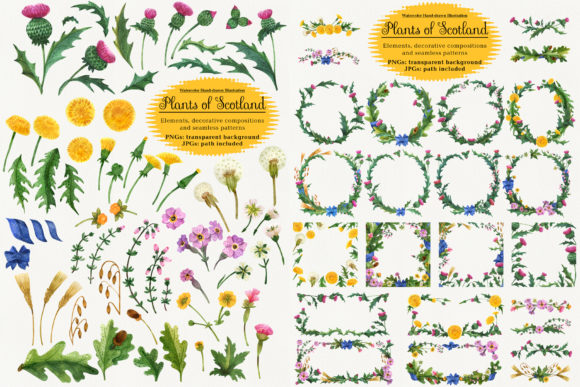
The collection includes 86 files built around 14 hand-painted elements including thistle, dandelion, heather, oak, Arenaria, barley, chickweed, Armeria, oat, cloudberry, buttercup, and primrose. Each element comes as a high-resolution PNG with a transparent background, with sizes ranging from 2000x2000 pixels for smaller items like cloudberry up to 11000x16000 pixels for the full element sheet. The blue ribbon accessory adds a useful linking element for compositions.
What many people miss is the decorative composition layer. Beyond isolated objects, the set includes 32 pre-arranged PNG files in transparent backgrounds. Boutonniere bouquets, banners, wreaths, square frames, round frames, and vignette endings are already laid out. If you are rebuilding a wreath from individual thistle images, you are duplicating work that the designer already solved.
The Seamless Pattern Layer That Changes Everything
Most users overlook the 40 seamless pattern JPGs. Twenty sit on white backgrounds, twenty on black backgrounds, all at 3000x3000 pixels. These are not filler extras. They are production-ready backgrounds for websites, fabric prints, paper goods, and packaging mockups. A common mistake is assuming you must create your own repeat patterns from scratch. The patterns here include the path information, meaning you can open the JPGs in Photoshop or Illustrator and see the layered structure. That allows you to adjust colors, scale, or rotation without starting over.
Mistake 1: Ignoring File Size and Resolution Mismatches
The thistle element comes in at 10,000 x 4,000 pixels. The primrose is 3,000 x 3,500. If you drop both into a single composition without scaling them relative to each other, you end up with a thistle that dominates the entire scene and a primrose that looks like an afterthought. The practical solution is to open the large elements first, then place smaller elements like Arenaria (2000x2000 px) or cloudberry (2000x2000 px) in layers above. Scale the large elements down rather than scaling the small ones up. Scaling up a 2000-pixel element to match an 11,000-pixel sheet introduces visible pixelation. The 300 DPI heritage of these files means they hold up well at print sizes, but only if you respect their native proportions.
Mistake 2: Overlooking the Pre-Arranged Compositions
You receive 32 decorative compositions. That includes 8 boutonniere bouquets at 2000x2000 px, 4 banner headers at 3000x1500 px, 8 round wreaths at 3000x3000 px, 4 square frames at 3000x3000 px, and 8 vignette endings at 2000x1000 px. Yet many users open the folder and immediately drag out individual thistle, heather, and oat elements to build a wreath from scratch. If you need a wreath for a wedding program, the round frame files already exist. Open them, adjust the colors or layer opacity if needed, and save an hour of alignment work. The composition files are not add-ons. They are core deliverables.
Mistake 3: Using JPG Patterns Without Checking Background Contrast
The seamless patterns come in two sets: white background and black background. If you place a white-background pattern on a white web page, the edges may blend, but if your project has a colored or textured background, you will see the white rectangle boundary. The same issue applies to black-background patterns on dark surfaces. The better approach is to open the JPG that matches your intended background tone. If you need a transparent-background version for a complex background, you can use the included path data to remove the white or black base. This is especially relevant for product packaging where the background is not pure white or pure black.
Mistake 4: Forgetting That PNG Layers Are Flat
Each element and composition file is a single-layer PNG with a transparent background. That means the watercolor texture is baked in. You cannot separate the thistle head from the stem within that file. If you need to adjust a specific part of a composition, you must work with masks or selection tools rather than expecting editable vector layers. This is not a flaw in the set. It is a characteristic to plan around. If you need flexibility per element, pull the individual element files and composite them yourself rather than relying on the pre-built wreath files as editable assemblies.
Inspect the Path Data
The JPG files include a path in the path panel. This is more useful than most users realize. When you open a pattern JPG in Photoshop and open the Paths panel, you see the clipping path that defines the element shape. You can convert this to a selection, refine the edge, or use it to remove backgrounds. If you are designing for print and need a precise cut line around a heather pattern, the path eliminates guessing where the edge falls.
Validate the Blue Ribbon Sizing
The blue ribbon accessory is 3,500 x 1,500 pixels. That is a relatively small element compared to the thistle at 10,000 pixels wide. If you plan to wrap the ribbon around a large wreath composition, scale it up carefully. The watercolor stroke detail in the ribbon holds up to moderate enlargement, but pushing it beyond 200% introduces visible softness. Consider using the ribbon as an accent inside smaller compositions or as a banner element rather than as the primary wrap for large frames.
Match the Element to the Intended Medium
The watercolor style works beautifully for digital invites, social media graphics, and print products with matte or textured paper. It tends to clash with high-gloss finishes or highly corporate layouts that use flat, vector-based branding. If your project requires a clean, modern vector aesthetic, these watercolor assets may feel out of place. That is not a flaw in the set. It is a matter of choosing the right tool for the right job. For rustic wedding suites, botanical blog headers, handmade product labels, and nature-themed branding, the style is ideal. For tech startups or industrial packaging, it may require significant desaturation or blending mode adjustments to fit.
Build From the Largest Element Down
Start your composition by placing the thistle (10,000x4,000 px) or oak (5,000x4,000 px) as your anchor. Then layer in medium elements like heather (5,000x4,000 px) or dandelion (9,000x4,000 px). Finally, add the smaller elements such as buttercup (3,000x3,500 px), primrose (3,000x3,500 px), or Arenaria (2,000x2,000 px). This prevents the common problem of a tiny element being scaled up until it loses detail. It also keeps your file size manageable because you scale down the big files rather than scaling up the small ones.
Use the Compositions as Layout Guides
If you need a custom arrangement, open one of the round frame files at 3000x3000 px as a reference layer. Place it below your working layer with reduced opacity. Then drag in individual elements and position them along the guide path. When you finish, delete the guide layer. This method preserves the balanced, professional layout that the original designer built while giving you full control over the specific elements you want to feature.
Batch Process Pattern Backgrounds
The 40 seamless patterns are delivered as JPG files. If you need both white-background and black-background versions of the same pattern for different projects, open the file, use the path to select the pattern area, and save a copy with the opposite background color. This doubles your usable library without purchasing anything extra. The patterns are designed to tile seamlessly, so you can also generate larger pattern swatches by duplicating the tile multiple times and merging the layers for oversized applications like wallpaper mockups or fabric design previews.
Who Benefits Most From This Collection
Small business owners creating branded packaging for botanical products will find the thistle, heather, and oat elements immediately useful. Wedding stationery designers can pull the boutonniere files and round wreaths directly into their templates without additional illustration work. Bloggers and content creators who need consistent botanical headers can rotate through the banner files for seasonal content. Educators building nature-themed learning materials can use the isolated elements on white backgrounds for worksheets and posters. The collection is less suited for architects, blueprint designers, or technical illustrators, but for anyone working in the lifestyle, wedding, nature, or craft space, it offers a complete visual vocabulary.
The Thistle Question
The thistle file is the largest single element at 10,000x4,000 pixels. It includes fine watercolor detail that rewards close viewing. At full size, it works as a hero image for a single-page layout. Scaled down, it fits into wreaths and frames without losing its recognizable silhouette. One frequent oversight is using the thistle at too small a size where the watercolor texture reads as unwanted noise rather than intentional artistry. Keep it above 1,500 pixels wide in your final design to preserve the painted quality. Below that threshold, consider using the simpler shapes like Armeria or cloudberry that read clearly at smaller scales.
Final Checks Before Purchase or Download
Confirm your software supports PNG files with transparent backgrounds and JPG files with embedded paths. Most modern design tools do, but if you work in a browser-based tool or a mobile app, some of the path data may not be accessible. Verify that the element sizes match your typical output. If you usually design for web at 72 DPI, these files are overkill. If you print at 300 DPI, the thistle alone covers over 33 inches at full resolution. That is useful for large-format posters. For standard letter-size prints, you will scale down significantly, which is fine as long as you avoid stretching small elements beyond 200%.
The Plants of Scotland. Watercolor collection rewards careful planning. The mistakes happen when users treat it as a simple image pack rather than a coordinated design system. By respecting the file sizes, using the pre-built compositions, matching background tones, and understanding the single-layer limitation, you get professional results with far less effort. The shortcuts are already built in. You just have to take them.